
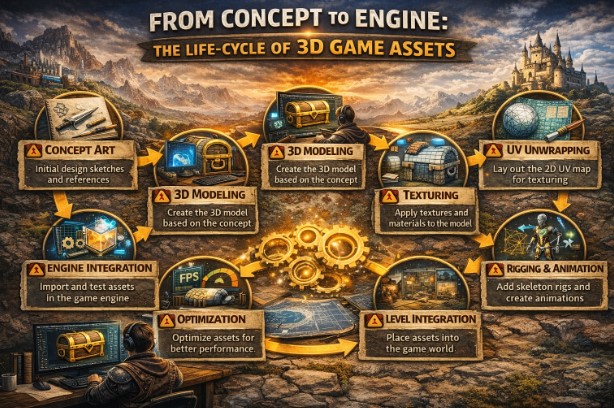
But behind every immersive game world is a complex production process of turning ideas into interactive experiences. What players see on-screen-the characters, environments, props, and objects-do not magically appear there.
Each such element goes through a structured life cycle of creative planning and technical execution with continuous refinement. Lying at the heart of this process are 3D game assets, which go through numerous stages before they are ready for real-time gameplay.
Concept and Visual Planning
The lifecycle begins with the development of a concept. In this stage, attention is focused on setting the visual identities of the game and translating ideas into visual references. Concept artists make sketches, mood boards, and reference sheets that establish style, tone, proportions, and materials.
Teams in this stage determine:
- Art Direction and Visual Style
- Character personalities and silhouettes
- Environmental topics, architectural language
Strong concept planning unites teams and reduces confusion later on in production. Clear references provide a visual blueprint against which assets are created.
Asset Breakdown and Production Planning
Assets are broken down into lists that are production-ready once the ideas are greenlit. The process involves identifying what assets are needed, their level of detail, and how often they will be reused.
Planning generally involves:
- Asset categorization, like Characters, Props, Environments, Effects
- Technical Requirements Definition
- Establishing naming conventions and workflows
The plan effectively supports the teams in managing the scope, resourcing, and consistency of the project.
3D Modeling & Geometry Creation
Modeling means giving concepts a shape in 3D. The artists build geometries from approved designs, focusing closely on proportion, structure, and form.
This phase includes:
- Blocking out basic shapes
- Refining forms for accuracy and style
- Clean topology maintenance for animation and optimization
Well-structured models are easier to animate, optimize, and modify later. Poor modeling decisions at this stage can have a long-lasting technical impact.
UV Mapping & Texturing
Once modeling is complete, assets move into UV mapping and texturing. UVs define how textures will wrap on a model; textures add surface detail like color, roughness, and material variation.
Good texturing practices include:
- Efficient UV layouts for maximum texture space
- Consistent texture resolution across assets
- Materials that respond naturally to lighting
This is a great contribution to realism and consistency in appearance. Even simple models will look great with strong textures.
Rigging and Animation -if applicable
Character and object rigging involves the creation of a skeletal system that will enable the models to move in a natural way.
After rigging, animators create:
- Character movements and gestures
- Combat and interaction animations
- Animated environmental objects, such as doors, machinery
Rig cleanliness and well-planned animations mean smooth deformation and believable motion during gameplay.
Optimization & Technical Refinement
Before this is ready for real-time, assets need to be optimized. Optimization ensures the assets perform well without sacrificing any visual quality.
This stage involves:
- Reduce unnecessary polygon density
- Level-of-detail versions creation
- Optimizing Textures and Materials
3D game assets must be strictly optimized in the performance budgets of a production pipeline, especially for games targeting many platforms. Optimization will prevent frame drops, memory issues, and long loading times.
Engine Integration & Testing
Assets are imported into the game engine after optimization. At this point, artists and developers see how the assets behave under real gameplay conditions.
Different types of integrations include:
- Material and Shader Assignment
- Setting Up Collisions and Physics
- Testing lighting and scale
The assets are continuously tested for functionality, appearance, and consistency in performance. Issues reported here usually result in changes in previous stages.
Iteration and Quality Control
Seldom is the creation of an asset a linear process. The feedback provided by designers, programmers, and testers leads to multiple iterations. Changes might be required to improve clarity of gameplay, visual consistency, or even performance.
Quality control focuses on:
- Visual accuracy against concepts
- Technical stability in the engine
- Consistency with Other Assets
Regular reviews ensure the level of quality and avoid letting small problems become big.
Collaboration and External Support
Many studios outsource asset production to third-party partners. Efficient scaling of teams and meeting deadlines permits the outsourcing of parts of the pipeline.
Working with a professional 3D visualization company will also help studios preserve quality and consistency when managing large volumes of assets.
Final Polish and Release Readiness
Pre-release, assets are polished. Minor visual adjustments and fixing bugs are made along with performance checks to make sure everything is up to quality.
Assets appear right under any lighting condition. No technical issues remain unresolved. Visual quality aligns with the overall gaming experience.
Conclusion
From early sketches to integration into the real-time engine, the life cycle of 3D game assets is a multi-stepped process that balances creativity with technical precision. Each phase in the life cycle-from concept to modeling and texturing to optimization and testing- plays an integral role in immersive and high-performance game delivery.
By understanding and respecting this life cycle, studios can work more smoothly, reducing errors in production and therefore creating assets that improve gameplay and stand the test of time.
